Inflight Entertainment and WiFi
Inflight Entertainment
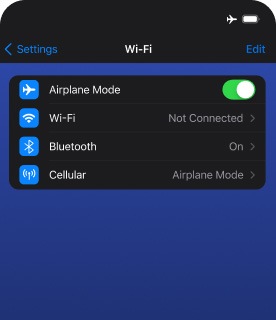

Head to Settings.
Turn on Airplane mode.


Turn on Wi-Fi.
Choose SouthwestWiFi from the WiFi network list.
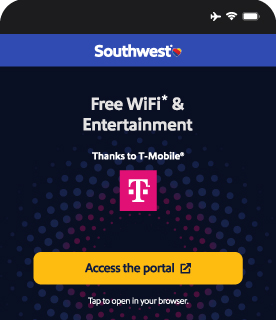

Tap Access the portal or open SouthwestWiFi.com in your browser directly.
 Still having trouble? Check out our FAQs.
 Please
use headphones when enjoying entertainment onboard.
Please
use headphones when enjoying entertainment onboard.
Free EntertainmentWhere available. Available only on WiFi-enabled aircraft. Limited-time offer.
We've got something for everyone. With a wide variety of new releases and long-time Customer favorites, all movies are viewable right in your browser - no downloads or sign-ups required!
New Releases















Avatar: Fire and Ash
In the wake of the devastating war against the RDA and the loss of their eldest son, Jake Sully and Neytiri face a new threat on Pandora: the Ash People, a violent and power-hungry Na'vi tribe led by the ruthless Varang. Jake's family must fight for their survival and the future of Pandora in a conflict that pushes them to their emotional and physical limits.
"Wuthering Heights"
A fearless reimagining of a legendary love story, where forbidden desire transforms into obsession and heartbreak in a sweeping saga of passion, lust, and madness.
GOAT
A goat with big dreams gets a once-in-a-lifetime shot to play roarball and revolutionize the sport.
Hamnet
Hamnet tells the powerful story of love and loss that inspired the creation of Shakespeare's timeless masterpiece, Hamlet.
Wicked: For Good
Return to Emerald City and continue to enjoy the magical world of Oz, with the second installment in a two-part adaptation of the Tony-winning Broadway musical.
A Big Bold Beautiful Journey
Two strangers discover magical doors that let them relive their pasts and rewrite their futures.
Anaconda
Two buddies filming their dream remake face chaos when a real anaconda joins the production.
Bugonia
Two conspiracy obsessed young men kidnap the high-powered CEO of a major company, convinced that she is an alien intent on destroying planet Earth.
F1: The Movie
Sonny's past catches up with him and he finds that, in FORMULA 1, the road to redemption is not something you can travel alone.
One Battle After Another
Washed-up revolutionary Bob exists in a state of stoned paranoia, surviving with his daughter, Willa. When his nemesis resurfaces and she goes missing, Bob scrambles to find her.
Springsteen: Deliver Me From Nowhere
A young Bruce Springsteen as he reconciles rising success with his past.
Superman
When Superman is drawn into conflicts both abroad and at home, his actions to protect humankind are questioned, and his vulnerability allows tech billionaire and master deceiver Lex Luthor to leverage the opportunity to get Superman out of the way for good. Will the Daily Planet's intrepid reporter Lois Lane, together with the aid of Metropolis's other metahumans and Superman's own four-legged companion, Krypto, be able to help Superman before Luthor can completely destroy him?
The Fantastic Four: First Steps
Set against the backdrop of a '60s-inspired, retro-futuristic world, Marvel's First Family faces a daunting challenge. Forced to balance being heroes with their family bond, they must defend Earth from a space god and his enigmatic herald.
The Housemaid
The Housemaid is a wildly entertaining thriller starring Sydney Sweeney and Amanda Seyfried, based on the best-selling book. From director Paul Feig, the film plunges audiences into a twisted world where perfection is an illusion, and nothing is as it seems.
Zootopia 2
Rookie cops Judy and Nick go undercover in the animal metropolis, Zootopia.
Rated E for Everyone














Raya and the Last Dragon
Raya seeks the legendary last dragon to stop the evil threatening humanity.
Moana
Moana sets sail on a daring mission to save her people. Along the way, she meets the mighty demigod Maui—together they cross the ocean on a fun-filled, action-packed voyage from Walt Disney Animation Studios.
Moana 2
Join the return of Moana and Maui as they set sail on an epic ocean voyage.
Space Jam: A New Legacy
Welcome to the Jam! Basketball champion and global icon LeBron James goes on an epic adventure alongside timeless Tune Bugs Bunny with the animated/live-action event Space Jam: A New Legacy.
Cars
Lightning McQueen is living in the fast lane, until he hits a detour and gets stranded in Radiator Springs, a forgotten town on Route 66. There he meets a heap of hilarious characters who help him discover there's more to life than fame.
DC League of Super-Pets
In DC League of Super-Pets, Krypto the Super-Dog and Superman are inseparable best friends, sharing the same superpowers and fighting crime in Metropolis side by side.
E.T. the Extra-Terrestrial
An alien is left behind on Earth and saved by the 10-year-old Elliott who decides to keep him hidden in his home. While a task force hunts for the extra-terrestrial, Elliott, his brother, and his little sister Gertie form an emotional bond with their new friend, and try to help him find his way home.
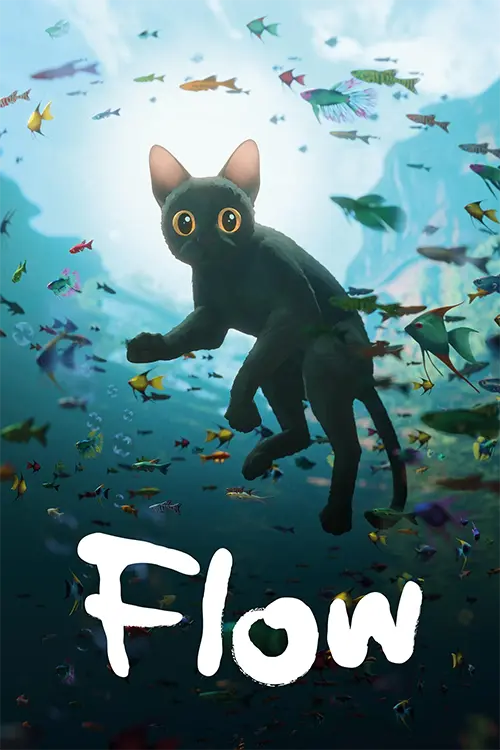
Flow
From the boundless imagination of the award-winning filmmaker Gints Zilbalodis comes a thrilling animated spectacle as well as a profound meditation on the fragility of the environment and the spirit of friendship and community.
Minions
Kevin, Stuart, and Bob embark on a journey to find a new despicable leader for their tribe and save all of Minionkind… from annihilation.
Mufasa: The Lion King
Follow the epic tale of the unlikely rise of the Pride Lands' beloved king. An orphaned Mufasa is lost and alone until he meets Taka, heir to a royal bloodline. This launches an epic journey that tests the pair's bonds as they evade a deadly foe.
Paddington in Peru
Paddington travels to Peru to visit his beloved Aunt Lucy, who now resides at the Home for Retired Bears. With the Brown Family in tow, a thrilling adventure ensues when a mystery plunges them into an unexpected journey through the Amazon rainforest and up to the mountain peaks of Peru.
The Lego Movie
Emmet is mistakenly identified as The Special and the key to saving the world. He is drafted into a fellowship of strangers on an epic quest to stop an evil tyrant.
The Super Mario Bros. Movie
The Super Mario Bros. Movie follows Mario and Luigi on a whirlwind adventure through Mushroom Kingdom, uniting with a cast of familiar characters to defeat Bowser.
The Wild Robot
Follow Roz, a shipwrecked robot, as she adapts to an island's harsh surroundings and becomes the adoptive parent of an orphaned gosling.
Zootopia
A rookie-cop rabbit and wily fox team up to crack a case.
TV Series












Brilliant Minds
The Office
Modern Family
Parks and Recreation
Brooklyn Nine-Nine
Friends
High Potential
How I Met Your Mother
Suits LA
The Big Bang Theory
The Simpsons
Young Sheldon
Live TVLive TV








Bold, Brave, and Brilliant: Pride Month
LGBTQ Pride Month is a time to honor the history, resilience, and brilliance of the LGBTQ+ community. It's a celebration of the voices, stories, and contributions that continue to shape our world. Join us as we recognize Pride Month with a collection of movies curated by our Out & Proud@SWA Employee Resource Group.





Love, Simon
Everyone deserves a great love story, but for 17-year-old Simon Spier, it's a little more complicated. He hasn't told his family or friends that he's gay, and he doesn't know the identity of the anonymous classmate that he's fallen for online.
The Color Purple
Torn apart from her sister Nettie and her children, Celie faces many hardships in her life. Celie ultimately finds strength in the unbreakable bonds of a new kind of sisterhood.
Bottoms
In this refreshingly unique comedy, two girls, PJ and Josie, start a fight club as a way to lose their virginities to cheerleaders. And their bizarre plan works!
Strange World
Despite differences, three generations explore an uncharted world together.
Am I OK?
Lucy and Jane have been best friends for most of their lives. Lucy confides in her friend something she's never acknowledged before, even to herself: She likes women.
Get connectedGet connected.

- Enjoy movies and TV for free—just bring your own device and headphones.1
- Rapid Rewards® Members can enjoy free WiFi thanks to T-Mobile®.1
- Free texting2 available with connection to WiFi.
Not a Member? Join Rapid Rewards® for free!
 Note: In order to provide a better experience, we may prohibit
access to certain high-bandwidth applications, websites, and video conferencing services. In
consideration of the public environment onboard we may also restrict potentially offensive online
content.
Note: In order to provide a better experience, we may prohibit
access to certain high-bandwidth applications, websites, and video conferencing services. In
consideration of the public environment onboard we may also restrict potentially offensive online
content.
Frequently Asked Questions
Before your flight
Our Inflight Entertainment Portal1 offers a variety of complimentary features, including a flight tracker1, on-demand movies and TV series, as well as live television3. Free texting2 available with connection to WiFi. Rapid Rewards® Members get access to Free WiFi thanks to T-Mobile®!1 Not a Member? Join3 for free now! Or purchase WiFi for $8 per device from takeoff to landing.3
We are excited to bring in-seat power to our aircraft beginning this year. Once installed, aircraft will feature USB-A and USB-C ports on each seat back, which are capable of delivering up to 60W of power.
Be sure to charge your device before boarding while we work to bring this functionality to all aircraft in our fleet.
Closed captions are available for movies, TV series, and Live TV when they have been made available by our providers.
During your flight
- Activate airplane mode with WiFi turned on.
- Choose "SouthwestWiFi" from the network list.
- Follow the prompt or visit www.southwestwifi.com in your browser.
You will need your Rapid Rewards® number handy to login to your account. If your Rapid Rewards® number is associated with your reservation, you can use your confirmation number for your current flight to access the WiFi.
You can use approved WiFi-enabled devices gate-to-gate, once onboard the aircraft. Please make sure your device is switched to "airplane mode" with "WiFi" turned on once the aircraft doors are closed. Connectivity is available for taxi, takeoff, and landing.
Internet connectivity may not be available for the full duration of flights to/from select international destinations.
Technical Help
We're sorry to hear that there were some bumps along the way. Please confirm that your device meets the minimum requirements for the Inflight Entertainment Portal. Southwest is unable to provide technical support, but you may email us by visiting the Southwest Help Center to report any problems you had with your onboard experience.
Please note that utilizing privacy browser modes or VPN functionality (such as Apple Private Relay) may impact product availability. You may also try resetting your browsing data according to the manufacturer's instructions for a smoother experience.
Using certain privacy functionality, including the use of VPNs like Apple Private Relay, may prevent some features from operating as expected. Please consider disabling these functions to better enjoy your inflight entertainment experience.
We accept the following payment options:
- Credit Card
- PayPal
- Apple Pay
- Venmo
We're sorry to hear that there were some bumps along the way. If you need help with your purchase please email us by visiting the Southwest Help Center.
The Inflight Entertainment Portal is supported on devices that meet the minimum requirements below. Browser support is limited to most recent version in addition to one previous version. Other devices and browsers may provide limited functionality.
Please note that utilizing privacy browser modes or VPN functionality (such as Apple Private Relay) may impact product availability.
|
Device |
Operating System |
Browsers |
|
iPhone |
iOS 16.0+ |
Google Chrome, Apple Safari |
|
iPad |
iPadOS 16.0+ |
Google Chrome, Apple Safari |
|
Android |
Android 13.0+ |
Google Chrome |
|
Mac |
MacOS 13+ |
Google Chrome, Apple Safari, Firefox |
|
Windows PC |
Windows 11+ |
Google Chrome, Microsoft Edge, Firefox |
1 Where available. Available only on WiFi-enabled designated aircraft. Due to licensing and other restrictions on select WiFi-enabled flights, free movies, TV series, and live TV may not be available.
2 Texting only allows access to iMessage and WhatsApp (which must be downloaded and activated before connecting to SouthwestWiFi).
3 WiFi access for $8 per device from takeoff to landing. Price is subject to change. May not be available for the full duration of flight. In order to provide a top-notch WiFi experience, we prohibit access to certain high-bandwidth applications and websites. We also prohibit access to certain obscene or offensive content.
All Rapid Rewards® rules and regulations apply and can be found at Southwest.com/rrterms.