TSA PreCheck® Touchless ID
Fly through airport security
TSA PreCheck Touchless ID is a new benefit for TSA PreCheck members. It uses facial comparison technology to verify your identity without needing to pull out a physical ID or boarding pass at select airport checkpoints. Locate the airport ambassador and show your mobile boarding pass with the TSA PreCheck Touchless ID indicator displayed. Walk up, walk through. It's that fast and easy. Get started by uploading your passport information into your Rapid Rewards® account. You'll be able to use the dedicated lane for TSA PreCheck Touchless ID for free whenever you travel through a participating airport.
Am I eligible for the program?
Eligibility requirements for TSA PreCheck Touchless ID:
- A Southwest Rapid Rewards® account.
- Have TSA PreCheck.
- Must be 18 or older.
- Must have a valid Known Traveler Number (KTN).
- Must have a valid passport.
- Customers must use their mobile boarding pass to access the dedicated lane for TSA PreCheck Touchless ID.
Learn more about TSA PreCheck Touchless ID.
How to opt-in to TSA PreCheck Touchless ID

Step 1
Log into your Rapid Rewards® account in the Southwest® app. Select “TSA PreCheck Touchless ID”.
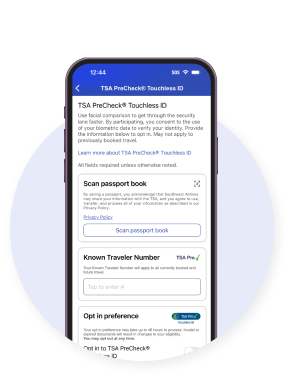
Step 2
Use your phone to scan your passport, enter your Known Traveler Number (KTN), and opt-in to the program.
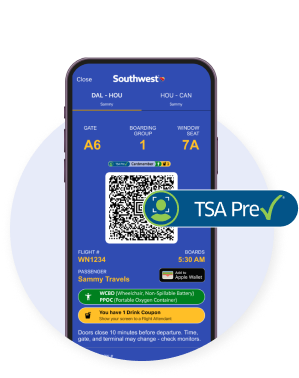
Step 3
On travel booked after your opt-in is saved, check your mobile boarding pass for the TSA PreCheck Touchless ID indicator.
Use TSA PreCheck Touchless ID
on your day of travel
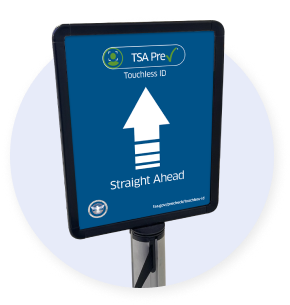
- Bring your physical ID with you.
- Customers must use a mobile boarding pass to be able to use the TSA Touchless ID dedicated lane.
- Look for the TSA PreCheck Touchless ID indicator on signs at dedicated “TSA PreCheck Touchless ID” security lanes.
- Participating airports: ABQ, ATL, AUS, BOI, BOS, BWI, CHS, CLE, CLT, CVG, DAL, DCA, DEN, DTW, FLL, HNL, HOU, IAD, IND, JAX, LAS, LAX, LGA, LGB, MCI, MCO, MDW, MIA, MKE, MSP, MSY, OAK, OKC, ORD, PBI, PDX, PHL, PHX, PIT, PSP, SAN, SAT, SEA, SFO, SJC, SJU, SLC, SMF, SNA, STL, TPA, and TUL
- Use your face as your ID through TSA security.
Still have questions? Learn more about TSA PreCheck Touchless ID here.